Sky and masks
Before fitting, elliprof prepares the image:
ELLIPROF then ignores every pixel that is exactly 0. That is how masked pixels drop out of the fit. It is also why the sky must be subtracted before the mask is applied, and elliprof does it in that order.
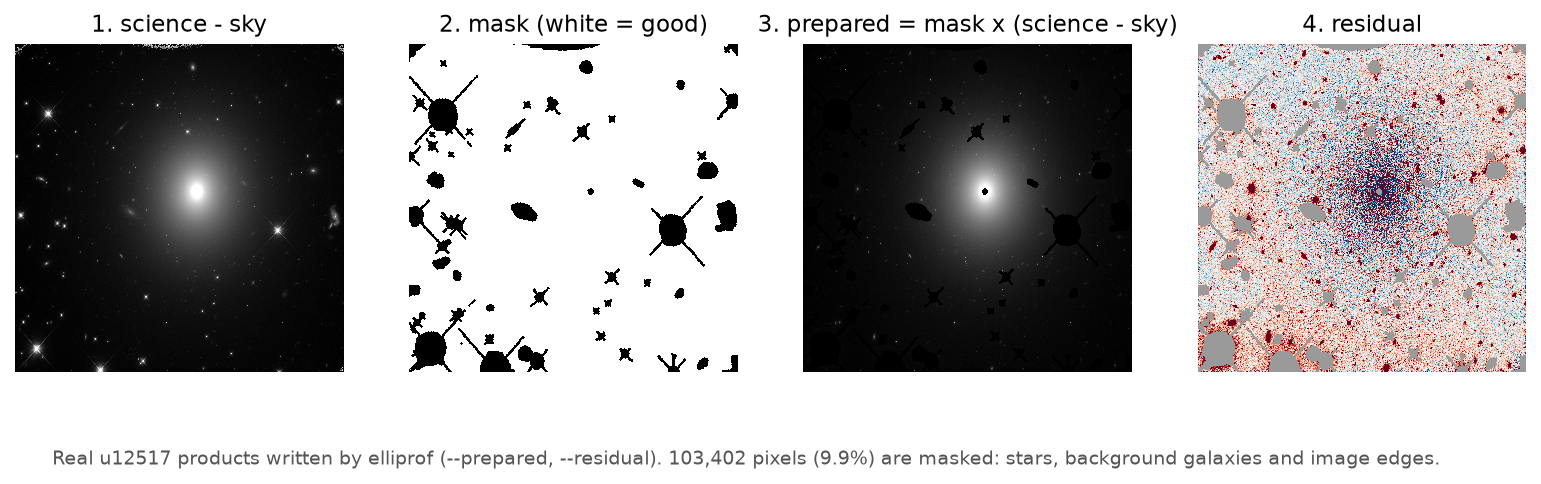
--prepared) is exactly what ELLIPROF
fits.The sky
ELLIPROF never estimates the sky for you. You supply it:
elliprof galaxy.fits --sky 1234.5 ...              # one constant level
elliprof galaxy.fits --sky-image background.fits ...  # a 2-D background
--sky VALUEsubtracts the same number from every pixel, in image units.--sky-image FILEsubtracts a background image pixel by pixel. It must have exactly the same dimensions as the science image.- Use one or the other, not both. Without either, nothing is subtracted. That is right only if your image is already sky-subtracted.
SKY= is not --sky
The original keyword SKY=s does not subtract anything. It is
used only by the de Vaucouleurs fit that ELLIPROF prints at the end.
To subtract a sky, use --sky or --sky-image.
Why the sky matters
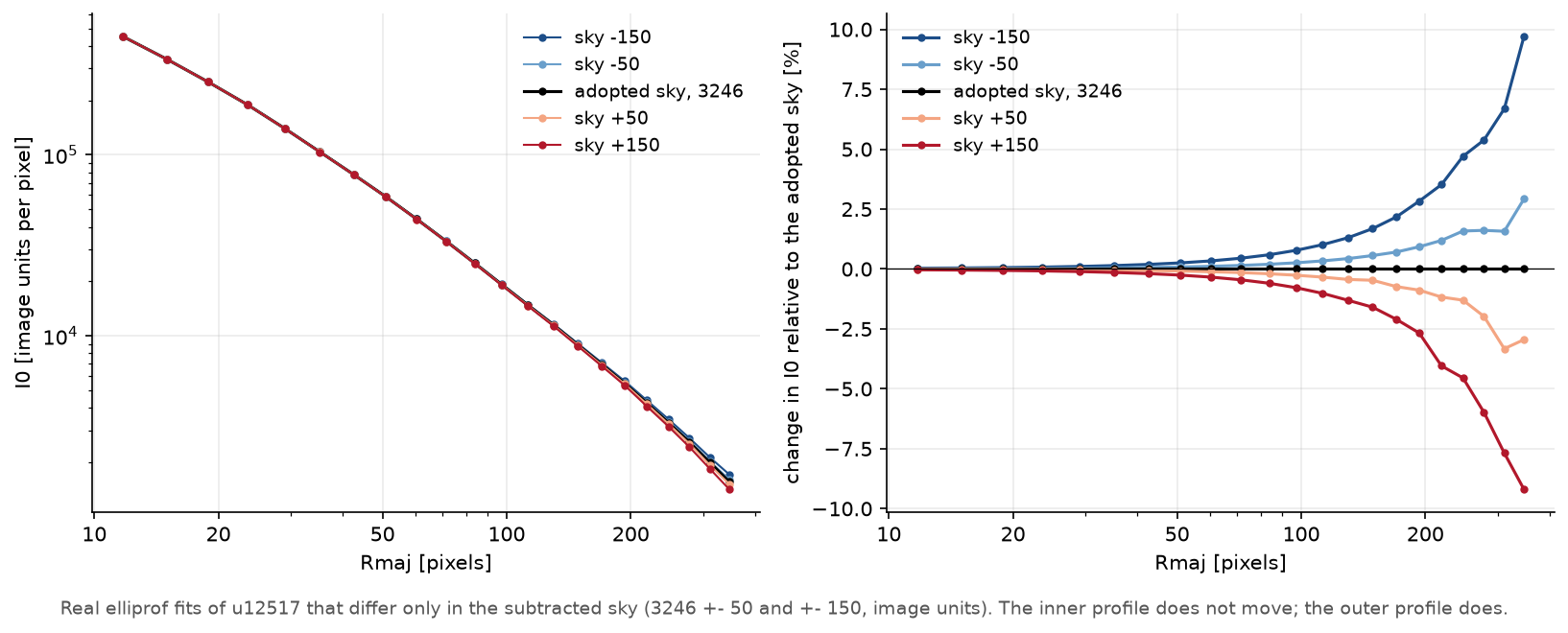
In the bright inner galaxy the sky is a small correction. In the faint outskirts the galaxy can be fainter than the sky, so a small sky error becomes a large fraction of the measured light. The outer profile comes out too bright if the sky was underestimated, and too faint (falling too steeply) if it was overestimated.
Measure the sky carefully
Measure the sky far from the galaxy, with sources masked, or fit it together with the galaxy's outer profile. Where the galaxy fills the image, the sky is uncertain, and so is the outer profile. Report the sky you used. Check how sensitive your results are by repeating the fit with the sky changed by its uncertainty, as in the figure.
Masks
A mask marks the pixels to ignore: stars, background galaxies, dust lanes, bad columns, cosmic rays, image edges.
The mask is logical: each pixel is either good (used) or bad (ignored). Two conventions are supported:
| Mask value | default: --mask-convention nonzero-good |
--mask-convention zero-good |
|---|---|---|
| 0 | bad (ignored) | good (used) |
| any other finite value (1, 2, −1, 0.5, ...) | good | bad |
NaN, ±Inf, undefined (BLANK) |
bad | bad |
In symbols: by default, good = finite and value ≠ 0; with zero-good,
good = finite and value = 0. The default is the original ELLIPROF
convention. zero-good suits bad-pixel maps, data-quality arrays and
segmentation maps, where 0 marks a clean pixel:
- The values are never weights. Bad pixels become exactly 0, and good pixels keep their value.
- The mask may be a FITS image of any type (
BITPIX8, 16, 32, 64, −32, −64), or a historical ELLIPROF.dmaskbitmap (BITPIX = 1). The type is recognised from the file itself. The test for 0 uses the value as stored, at full precision (so a tiny 64-bit value such as 10⁻³⁰⁰ is not 0). - A
.dmaskbitmap always means 1 = good, 0 = bad;--mask-convention zero-goodis refused for it. - It must have exactly the same dimensions as the science image. Nothing is ever resized, interpolated, cropped, shifted or reprojected.
- A mask in a FITS extension is chosen like an image:
--mask 'products.fits[MASK]'.
Making a mask
elliprof uses masks but does not make them. Common ways are a source-detection program (such as SExtractor or photutils) with the detected sources grown by a few pixels; hand-drawn DS9 regions turned into a mask; or both. Mask generously around bright stars, including their diffraction spikes.
A pixel that is exactly 0 is always ignored
ELLIPROF cannot tell a masked pixel from a good pixel whose sky-subtracted value happens to be exactly 0. With floating-point images this is rare. With integer images and an integer sky it can happen, so check the number of masked pixels that elliprof reports.
The prepared image
--prepared FILE writes the image exactly as ELLIPROF fits it:
mask × (science − sky), as floating-point FITS (32-bit from the single
backend, 64-bit from the double one; see Precision) with the
science image's header and WCS. Look at it whenever a fit behaves oddly. Most problems
(a wrong sky, a mask that is too small, an inverted mask) are obvious in
the prepared image.
See also Model, residual and prepared images.